Targeting is the primary source of confusion among advertisers today. It’s so bad that most advertisers don’t even realize how confused they are. They completely misunderstand their level of control and required involvement in the process.
It’s not the advertisers’ fault. Meta has made so many changes during the past five years to targeting terminology and functionality that any confusion is understandable.
Ultimately, the bulk of the confusion centers around the idea of audience suggestions. Even the way Meta defines audience suggestions has changed.
Originally, Meta said that your audience suggestions would be prioritized before searching more broadly.

But Meta makes no such guarantees now, only that your ads will be shown to people outside of your suggestions “when it’s likely to improve performance.”

In my experience, suggestions are not prioritized. They may even be ignored. We can prove this when using breakdowns by age, gender, and even audience segments (when using suggestions that match our defined audience segments).
And since suggestions may not even be prioritized, it’s more important than ever to understand when our inputs are used as suggestions in the first place. Confusion isn’t limited to the inputs that Meta uses as suggestions. There are also baseless conspiracies related to location targeting and exclusions.
Let’s clear up all of this nonsense. Here’s a summary of the level of control that’s possible, focusing primarily on turning suggestions on and off, for each targeting type…
Detailed Targeting
In the default Audience section of the ad set, advertisers can provide detailed targeting inputs (interests and behaviors). When provided here, detailed targeting is only an audience suggestion.
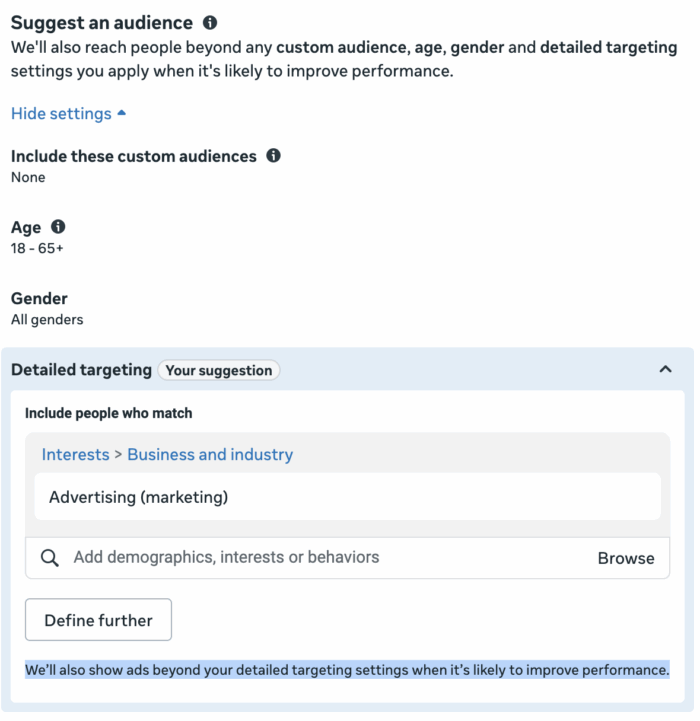
From there, it gets complicated. You can click the “Further limit the reach of your ads” button at the bottom and switch your setup.
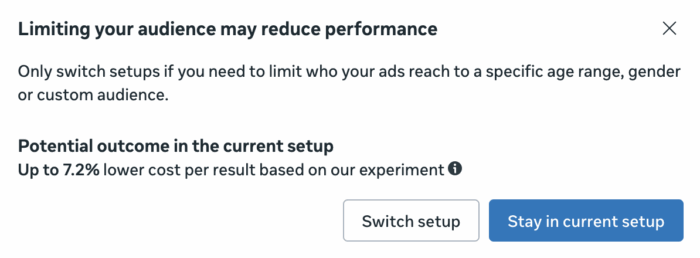
When you do, you might be able to turn off suggestions for detailed targeting. In reality, you probably won’t.
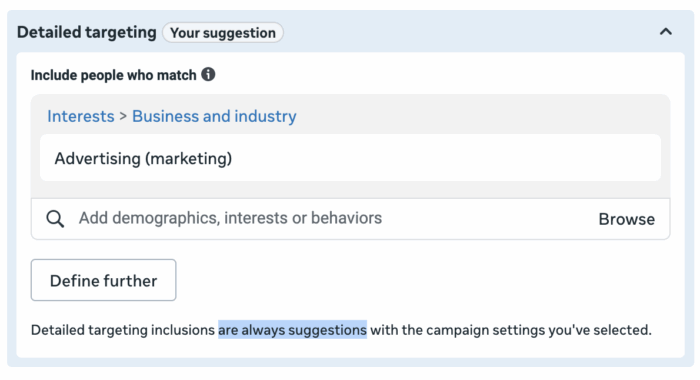
There’s a bit of history here. Ever since the original Detailed Targeting Expansion feature was released in 2021, Meta has repeatedly further limited advertiser control. The original feature was optional. Eventually, it was forced for three performance goals, including number and value of conversions. Then it expanded to link clicks and landing page views.
Today, advertisers are unable to restrict an audience to detailed targeting inputs when using any of the following 11 performance goals:
- Maximize number of conversions
- Maximize value of conversions
- Maximize number of landing page views
- Maximize number of link clicks
- Maximize number of app events
- Maximize number of conversations
- Maximize number of Instagram profile and Facebook page visits
- Maximize number of calls
- Maximize number of reminders set
- Maximize number of leads
- Maximize number of conversion leads
When any of these are selected, detailed targeting is only seen as an audience suggestion. This list consists of a large portion of the most commonly used performance goals, so your options for control are severely limited. But if you use one of the few performance goals not listed above, you’ll be able to turn suggestions off.
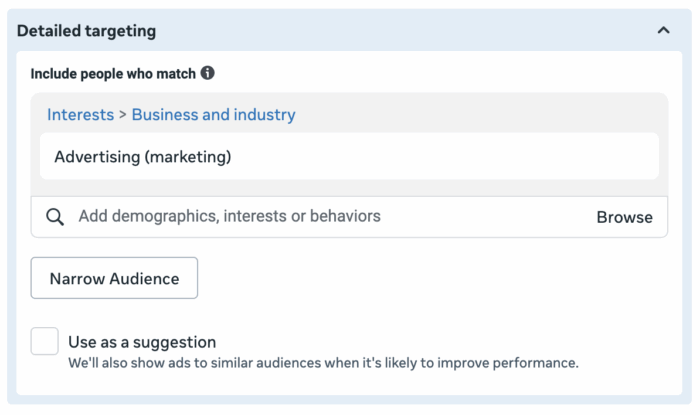
But again, this is the rare exception, not the rule.
Lookalike Audiences
When you provide a lookalike audience in the main Audience section of an ad set, it will only be seen as a suggestion.
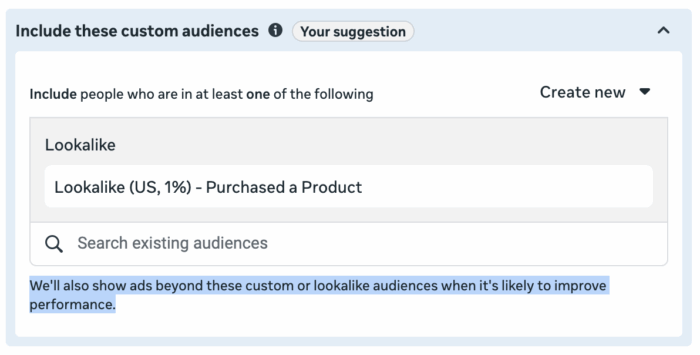
Your options for restricting targeting to a lookalike audience, like with detailed targeting, are severely limited. You can choose to “further limit the reach of your ads.”

When you do, you might be able to remove suggestions. But, like with detailed targeting, your ability to do so is limited by the performance goal.
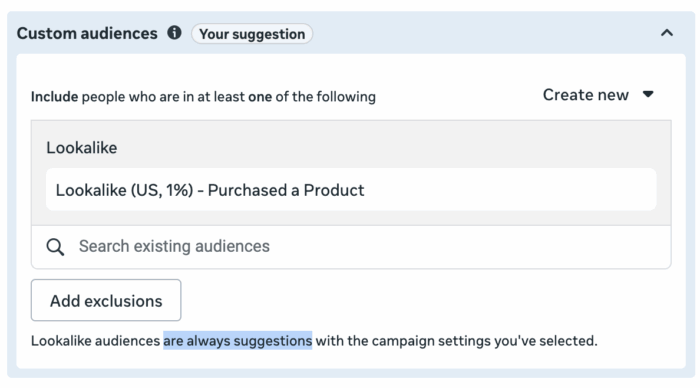
For the longest time, Meta only prevented advertisers from restricting targeting to a lookalike audience when using performance goals to maximize the number or value of conversions. But in late 2025, that changed.
You cannot turn off suggestions from lookalike audiences when using the following nine performance goals:
- Maximize number of conversions
- Maximize value of conversions
- Maximize number of landing page views
- Maximize number of link clicks
- Maximize number of app events
- Maximize number of conversations
- Maximize number of calls
- Maximize number of leads
- Maximize number of conversion leads
But if you use any of the less common performance goals not listed, you can still remove suggestions.
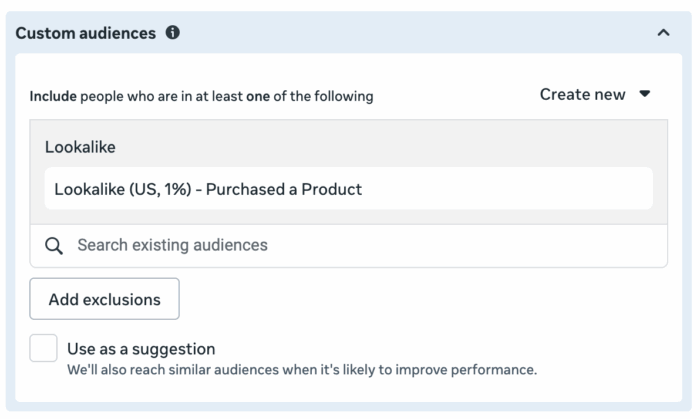
More often than not, however, the inputs you use for detailed targeting and lookalike audiences will be suggestions only.
Custom Audiences
If you provide custom audiences in the initial Audiences section, they’ll only be seen as a suggestion. Meta can and will completely ignore these inputs to get you more results.
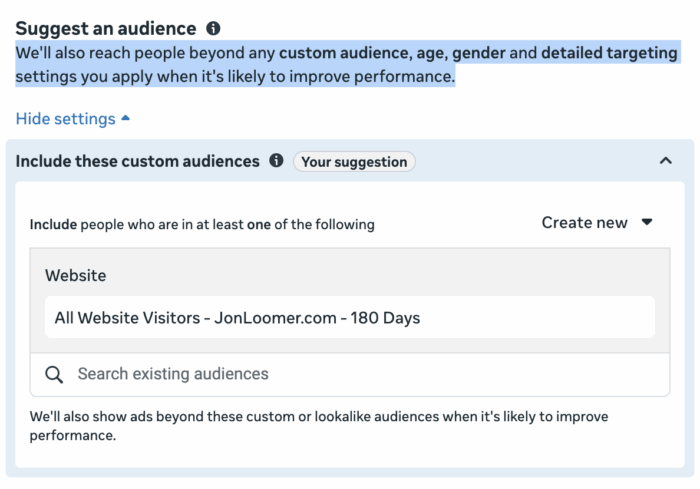
It is incredibly common for advertisers to completely miss this. Based on my experience, many advertisers who think they’re remarketing aren’t actually remarketing at all. The audience was only a suggestion.
It’s still possible to restrict targeting to a custom audience, of course. But first you’ll need to click “Further limit the reach of your ads.”
Once you switch the setup, you’ll need to uncheck the box to use your selected custom audiences as a suggestion.
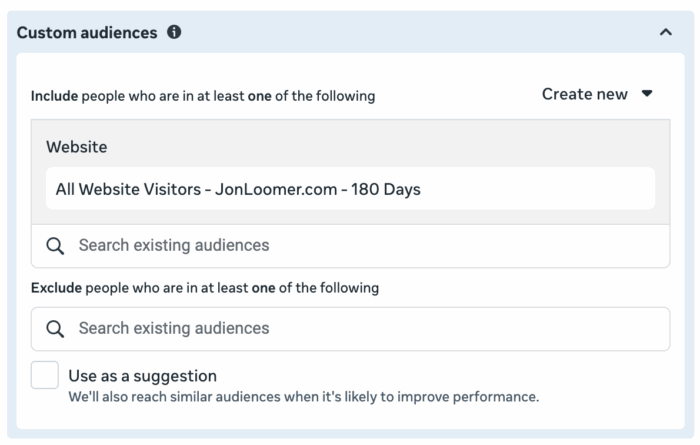
There’s a separate conversation about whether remarketing is necessary in most cases now. But you can remove suggestions when targeting custom audiences if you want.
Age and Gender
When customizing age and gender selections in the main Audience section, you’ll be doing this as a suggestion.
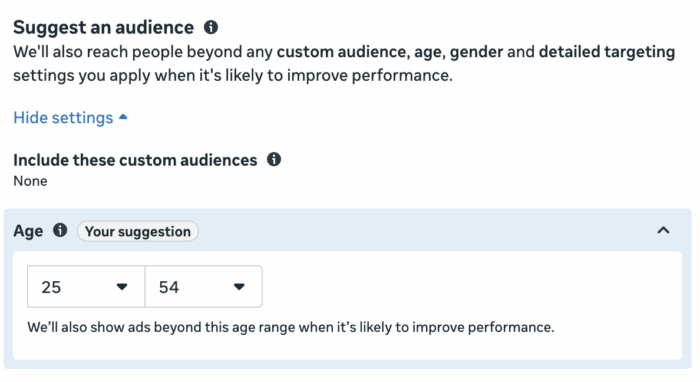
But Meta can and will ignore those suggestions to get you more results. Unlike suggestions for detailed targeting and lookalike audiences, you can use breakdowns to prove how much Meta goes beyond demographic suggestions. And I’ve found these suggestions make very little impact, if any at all.
You’re not required to use suggestions with age and gender settings. You can click the link to “Further limit the reach of your ads” to apply more control.
When you switch setups, you’ll need to uncheck the box to use your age or gender inputs as suggestions.
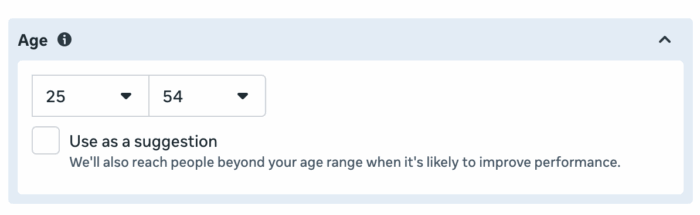
This should be avoided when possible. Even if there’s a specific problem to be solved related to information that you have and Meta doesn’t, you should use value rules to influence delivery instead of restricting by demographics.
Locations
Locations are part of Audience Controls, which are separate from Audience Suggestions. They will never be seen as suggestions.
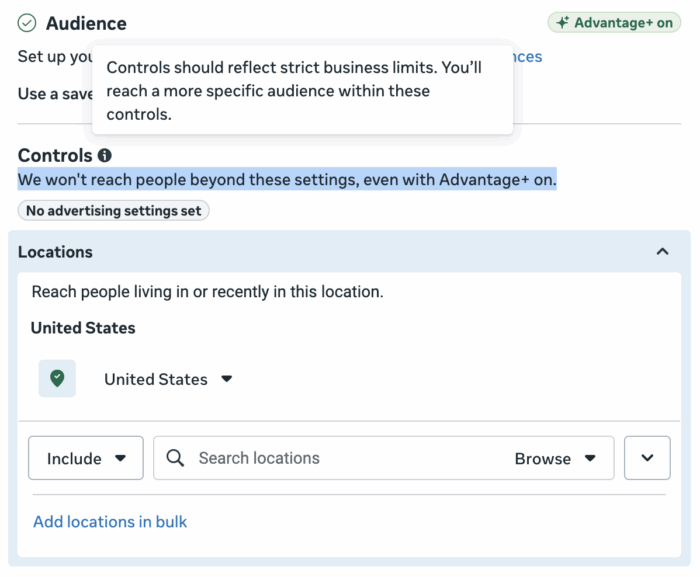
It’s apparent that Meta knows about the conspiracy theories related to location targeting, though. I’ve often heard the claim that locations aren’t respected when using certain setups. But Meta states explicitly that “We won’t reach people beyond these settings, even with Advantage+ on.”
Location targeting isn’t perfect, of course, and the only option is to reach people “living in or recently in” your selected location. You can’t restrict your targeting only to locals or tourists, and people can get around these controls with VPNs.
But the locations you define are not suggestions, and Meta won’t choose to simply ignore these controls to get you more results. Your location inputs are respected.
Exclusions
You can exclude either custom audiences or lookalike audiences. In the fall of 2024, Meta removed the ability to exclude detailed targeting.
Like Locations, exclusions are part of Audience Controls. Exclusions will never be seen as suggestions.
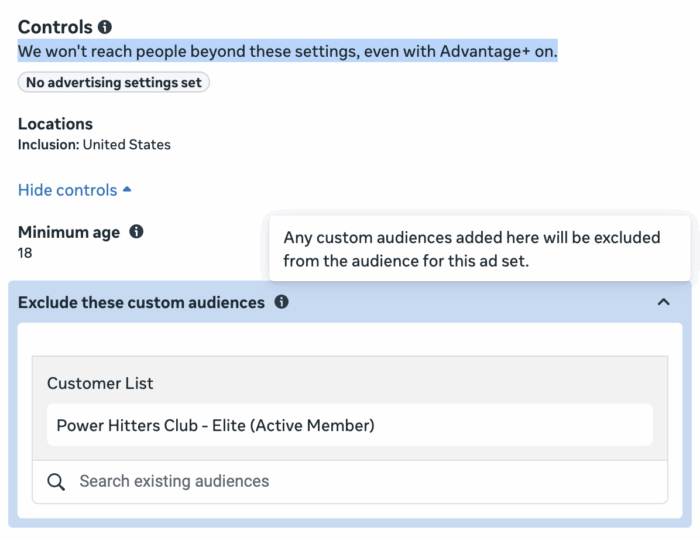
As is the case with location targeting, I’ve seen the claim that Meta will ignore your exclusions when using certain setups. This just isn’t true.
That doesn’t mean that exclusions are perfect. You will undoubtedly reach people you were hoping to exclude. But that’s not because Meta ignored this control, and it’s not because exclusions are suggestions.
Your ability to exclude a given custom audience is only as good as the completeness of that audience. User error assembling these audiences aside, it’s virtually impossible to guarantee you won’t reach any of the people you’re trying to avoid.
Accept that this is normal. Make it a goal to provide custom audiences that are as complete as possible to limit the number of people who slip through. But it’s going to happen.
Summary of Control
Your inputs used for locations and exclusions are always respected. They are audience controls and never seen as suggestions. That doesn’t mean there aren’t holes in each, of course, but Meta won’t randomly show your ads to people outside of these controls.
When you provide age and gender settings within the main Audience section, these are suggestions. Meta can and will show your ads to people outside of those demographics to help get you more results. While you can restrict by age and gender, you should usually use value rules when there’s a problem to be solved.
The custom audiences provided in the main Audience section are suggestions only. Meta will show your ads to people outside of these inputs, so you aren’t technically remarketing when taking this approach. You can restrict targeting to custom audiences by removing suggestions, though Meta will prioritize remarketing audiences automatically.
Detailed targeting and lookalike audience inputs are suggestions when provided in the main Audience section. In most cases, you will not be able to remove suggestions and restrict targeting to either of these audience inputs. You cannot remove suggestions from detailed targeting inputs when using 11 performance goals or from lookalike audiences when using nine.
General Approach
It’s important to understand that even if you want to control targeting, it’s rarely possible. And when it’s possible, it’s rarely recommended.
Age and gender should rarely be restricted. Meta will go beyond your suggestions to get results. If there’s a problem to be solved (you have information that Meta doesn’t), use value rules.
Detailed targeting and lookalike audience inputs are almost always suggestions. You can’t avoid it. We have no way to reliably prove the impact of these suggestions or whether Meta follows them all that closely. Spend very little time worrying about detailed targeting and lookalike audiences as a result, and never create multiple ad sets based on these inputs.
Your custom audience suggestions are not tight constraints. You are not remarketing, and a separate ad set with custom audience suggestions is unnecessary and counterproductive. Restricting by custom audiences is rarely necessary since Meta will prioritize these audiences anyway. You can prove this with sales campaigns and audience suggestions.
The bottom line: The less you obsess over targeting inputs now, the better. Suggestions aren’t restrictions. Restrictions are not always possible or even helpful.
Let go of the targeting control you do not have. Question whether you need the control that’s possible. And dedicate your time and energy to the areas that make the most impact: Your ad copy and creative.
Free Mini-Course
Modern Targeting: 8 Lessons on What’s Changed and What to Do About It
Covers audience suggestions, value rules, why remarketing is automatic now, the reality of detailed targeting and lookalikes, and a standard approach to targeting today.
Get the Free Course →
Your Turn
Anything you’d add related to targeting suggestions and control?
Let me know in the comments below!
The post When Your Targeting Inputs Are Only Suggestions appeared first on Jon Loomer Digital.