It’s easy to take for granted how complicated Meta advertising is. But the problem is that so many advertisers make it far more complex than it needs to be.
That’s a huge problem for beginners and those still figuring it out. It’s why I created the following checklist of the 10 things you should focus on.
While beginners were the inspiration for this post, there’s value here for everyone. Consider each item a reminder about what’s truly important and what’s not when creating your campaigns and analyzing results.
Start here…
1. Create a Simple Campaign
One of the most common mistakes that all advertisers make is that they overcomplicate things. Since most advertisers do it, you can bet that beginners do, too.
The instinct is to create multiple campaigns and ad sets, for a long list of reasons. It could be to promote different things or to test or to segment your audience. None of these are particularly great reasons, especially if you don’t know what you’re doing.
Focus on one goal. Create one campaign. Create only a single ad set within it. Avoid customizing any of Meta’s default settings unless you have a very clear reason for doing so.
This doesn’t mean that there’s never a reason to add complexity and create multiple campaigns or ad sets. But beginners are the absolute last group of people who should be doing this. You want fewer moving parts, not more.
My recommendation of a simplified approach doesn’t only go out to beginners, of course. It’s a philosophy that I follow. You can read all about it in my free Ad Brief.
2. Know the Impact of Budget
One of the reasons that you should simplify your campaign structure is that every extra campaign and ad set waters down whatever budget you have. If you’re closer to a beginner than an expert, you’re rarely working with much budget to start with.
Know that spending $10 to $20 per day is going to make very little impact. But spending at the lowest amounts can still be worthwhile, if for nothing more than the experience. It’s a good way to gain confidence before turning up the spend.
Do not spend more than you’re comfortable spending, particularly when you’re still figuring things out. Yes, more budget will lead to more data for Meta, more results for you to learn from, and more of an impact overall. But you can also waste money quickly if you’re not careful.
There’s a general approach to setting your budget that I recommend. If it seems that you’re more comfortable spending far less than what’s optimal, don’t be discouraged. Spend what you’re comfortable spending and then start increasing your budget as you see the benefits.
3. Set Up Tracking
You will not get the full benefits of Meta advertising without setting up conversion tracking. You won’t know when ads drive conversions. Just as important, Meta won’t know when conversions happened to help you get more of them.
It would be easy to overwhelm you with a long list of things you should do here, including setting up the Conversions API (for both web and CRM), standard events for every important action, custom events for every important action not defined by a standard event, and custom conversions to help segment your results.
But that’s not necessary to get started. You eventually want to get there, but it’s not required before you start running ads.
At the bare minimum, make sure to install the Meta pixel on your website. This could be very simple, depending on your business. Most commerce platforms have integration solutions built in.
After that, you’ll need to confirm you have standard events set up for the most important actions that happen on your website. When someone completes a purchase, the Purchase standard event should fire. When they complete a lead form, it would be the Lead event.
Once again, partner integration is the easiest way to accomplish this. Another would be Meta’s Event Setup Tool. While it’s a bit limiting, it doesn’t require code and is reasonably straight forward.
Long-term, you’ll want to do much more than this to be sure you’re sending the most complete set of events possible. But for now, do enough to get started.
4. Focus on Conversions
When you create a campaign, you should use either the Sales or Leads objective. The objective itself does nothing (a common misconception), but it does assure you’ll have access to the settings you need to focus on conversions.
In most cases, you’ll want to use the “Website” conversion location in the ad set. The performance goal is where you define the action that you want.
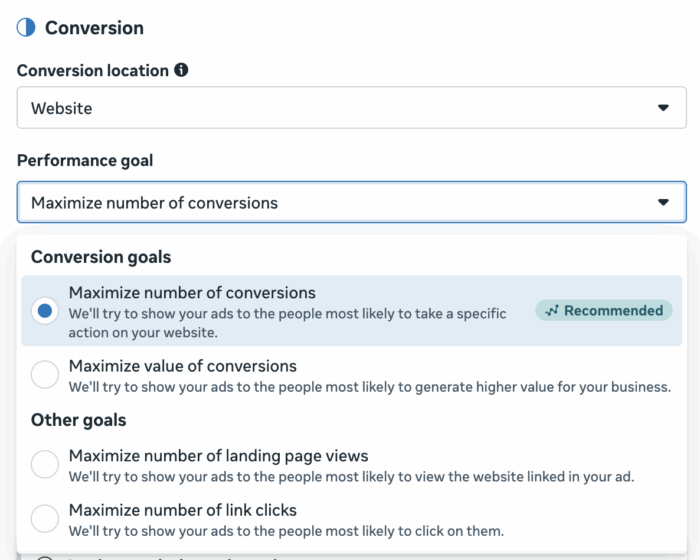
Don’t get cute here. It’s easy to go off track by optimizing for top-of-the-funnel actions like link clicks, landing page views, ThruPlay views, post engagement, and more. Just know that you’ll almost always end up with low-quality actions when you do.
You should use “Maximize number of conversions.” When you do, Meta’s focus will be on getting you as many conversions as possible within your budget. The type of conversion you want is defined by the conversion event.
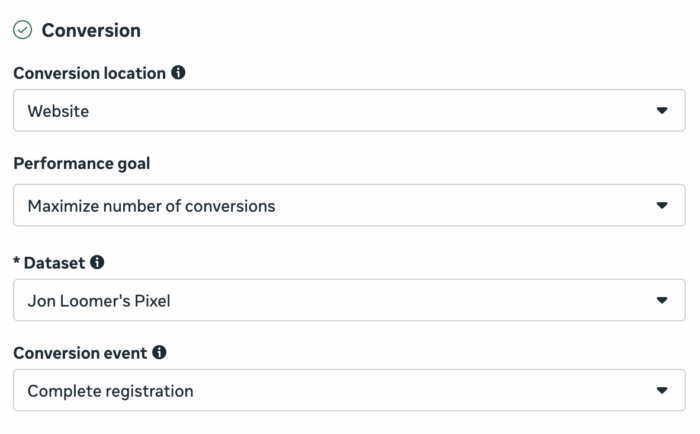
This would need to be an event that you’ve already set up successfully and that Meta detects, of course. Refer back to budget considerations and the expected cost per conversion before defining this. For modest budgets, it’s usually better to go for cheaper actions, like a lead.
If you use the Sales campaign objective, you’ll have access to conversion events like Purchase and Complete Registration. If you want to optimize for the Lead event, you’ll need to use the Leads campaign objective (an annoying quirk of Meta campaign setup).
One alternative would be to use instant forms with the Leads objective instead of sending people to a landing page.
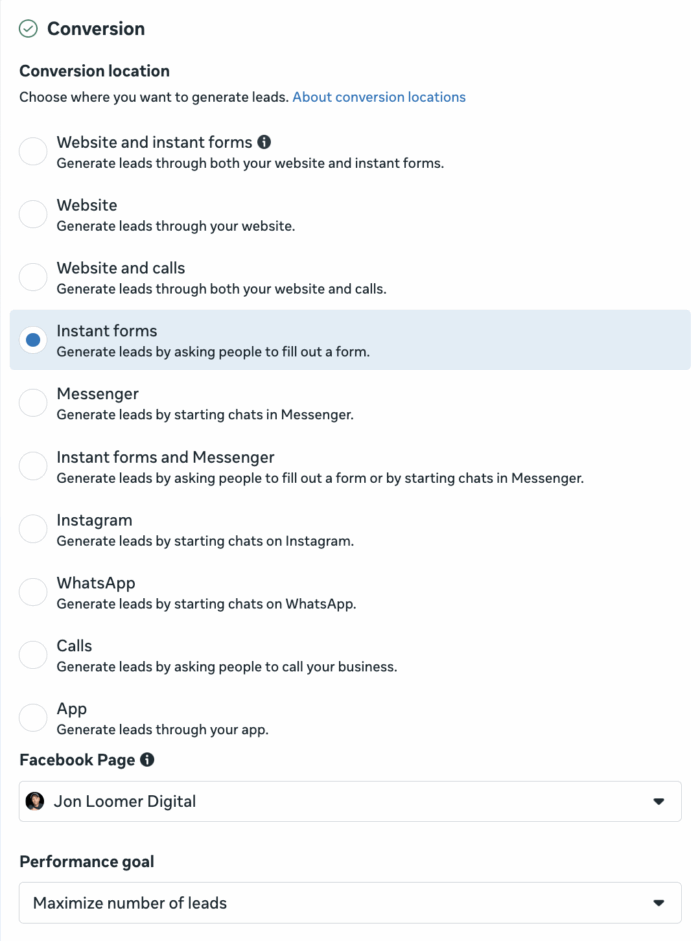
When you go this route, users will be kept on Facebook, Instagram, Threads, and Messenger (depending on where they see your ad) and won’t be sent to your website. It’s not a bad option if your website isn’t ready or tracking isn’t set up properly.
Just know that you’ll need to either manually download the leads that come in or set up an integration to send new leads to your CRM.
5. Spend Little Time on Targeting
I want you to resist the urge to micromanage the audience section.
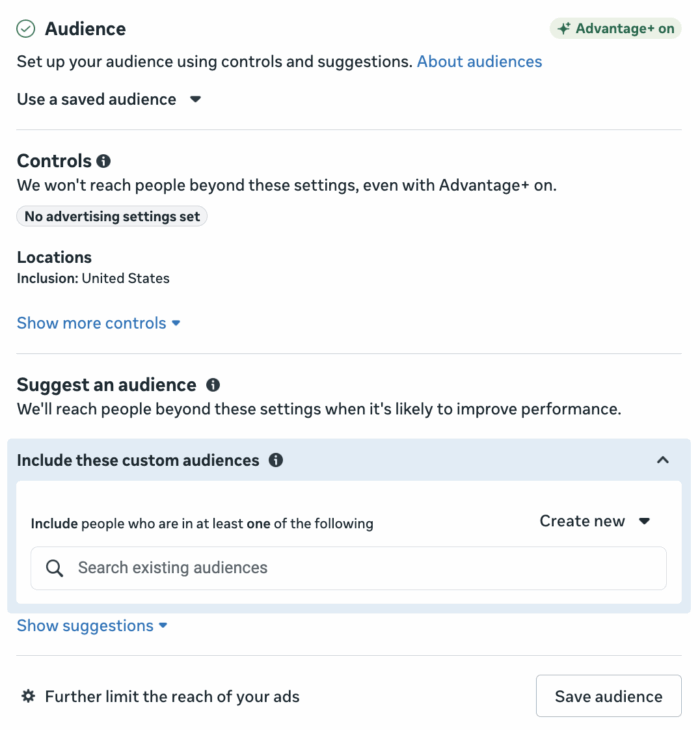
You’re going to hear a lot of outdated advice about targeting. Don’t let it distract you. It’s not relevant now.
You should define the countries that are eligible to be shown your ads.
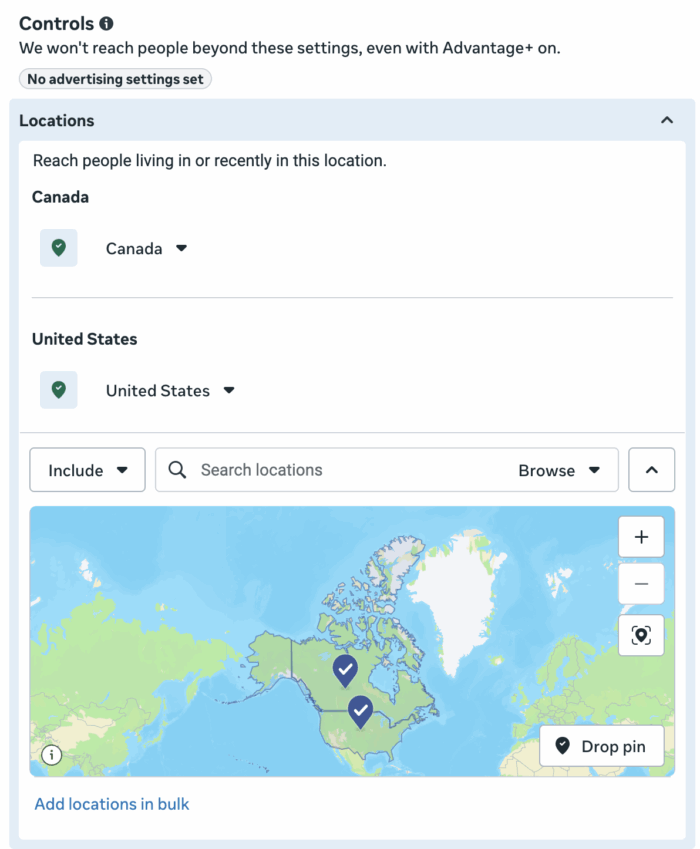
If you’re a local business, define the relevant region.
While this is a tight constraint, it’s important to remember that location targeting is based on people “living in or recently in” a location. You will never completely avoid reaching people outside of your target location, but you can control it.
Otherwise, know that age and gender are suggestions by default.
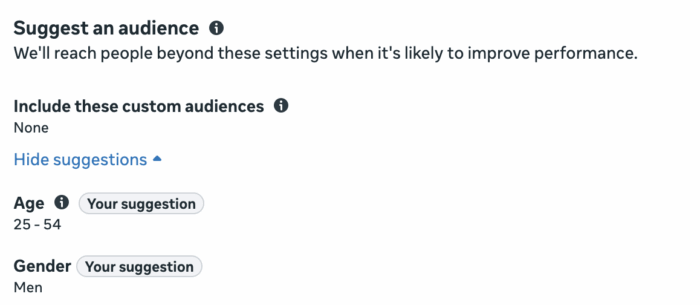
While you can technically restrict by age or gender, I wouldn’t do it unless you had a very good reason for it. And when there’s a problem to solve, I’d recommend using value rules instead of restricting by demographic anyway.
You can provide detailed targeting (interests and behaviors) and lookalike audiences, but know that these inputs will almost always be audience suggestions. You can rarely restrict by these groups — especially when optimizing for conversions.
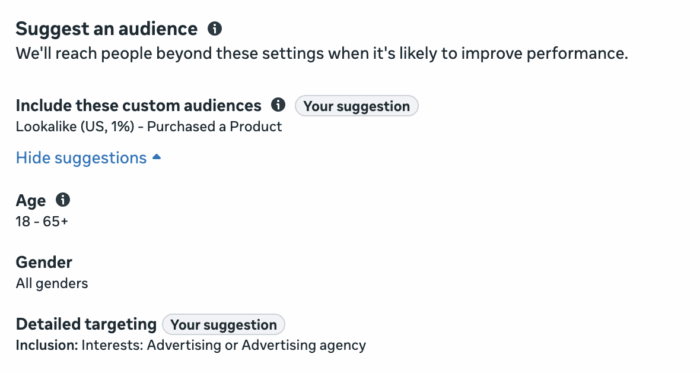
You’ll also hear all about “magical” remarketing strategies, where you target your existing customers, website visitors, social media engagers, and email list. While you can technically restrict by custom audience, you often don’t need to.
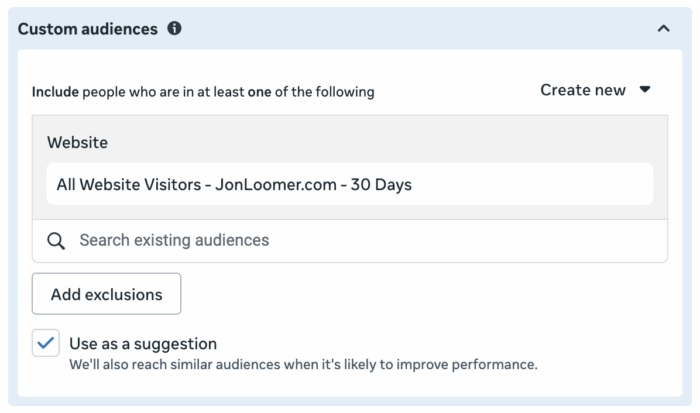
Assuming Meta has conversion events from you, remarketing will happen naturally anyway.
My main point here is this: You can waste a lot of time and money obsessing over targeting inputs that rarely do what many advertisers think they do. While there are always rare times when restrictions may be necessary or remarketing might be helpful, these are exceptions that should not be approached as the rule.
Feel free to use targeting inputs as suggestions, though there’s little evidence they do much. Otherwise, prioritize taking a hands-off approach to this area, as counterintuitive as that advice may seem.
6. Do Not Touch Placements
The default setting for placements is Advantage+ Placements. Meta will distribute impressions between all of the various options in an optimal way with the goal of getting you the most results possible.

Ignore the urge to remove placements based on where you think your ideal customers are. Also avoid removing placements that you believe are less effective. These adjustments often do little more than limit your impressions and drive up costs.
Some placements are more effective than others. Costs also reflect that effectiveness. Meta will balance volume of impressions with trying to serve your ad in placements that will help give you the most results overall.
While there are problematic placements, these are rarely an issue when optimizing for a conversion of any kind. Understand that because the algorithm is literal (Meta wants to get you the action you’re optimizing for), you’ll rarely see Meta waste your budget on those ineffective placements when optimizing for conversions.
That doesn’t mean that every placement will lead to conversions. But some impressions are an important part of a customer’s decision-making process, whether they directly inspired the conversion or not.
The bottom line is that you should rarely touch anything here. Even if you’re having an issue with a problematic placement (you’ve proven this in your results), the solution is usually found with value rules.
7. Start with Two Ads
You’re going to hear a lot about Meta Andromeda and creative diversification. Ignore most of it. Most of what you hear about this assumes scale, volume, and testing velocity that beginners simply don’t have. Your main takeaway should be to approach ad creation in the spirit of diversity: Diverse formats, text, angles, and visuals.
But it doesn’t mean that you need to create a lot of ads. In fact, you can still get good results from one or two ads, especially at modest budgets. If the thought of creating five ads or more overwhelms you, it’s okay. Start small.
Keep it simple and start with two ads. When you do, focus on the following…
Video and Static Image
Create one of those ads with a video and one with a static image. That way, you don’t commit to one format and you give Meta options based on placements.
Utilize Text Options
You are able to generate up to five primary text and five headline options. Use them. Lean into different pain points, solutions, or customer personas. Or just come up with different angles.

This isn’t so that you can find the best performing primary text or headline option. It’s to give Meta options that work for the right people — or the right segment of your audience.
You can also use Meta’s AI-generated text options, but I’d recommend reading them first before blindly accepting them.
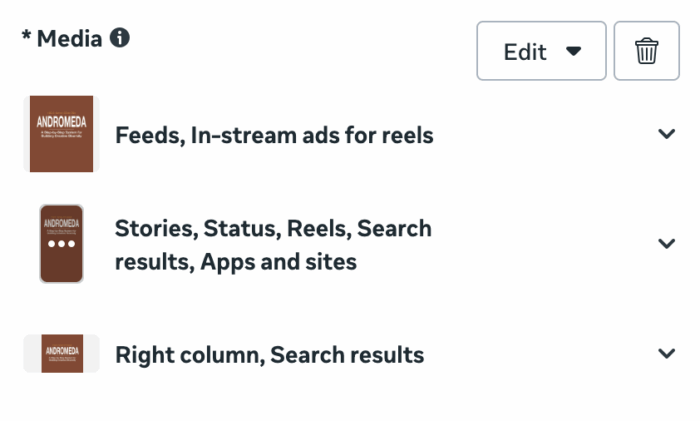
Customize Creative by Placement
Meta isn’t particularly great about walking advertisers through the ideal aspect ratios. But typically, you should provide square or 4:5 creative for feeds, 9:16 for stories and reels, and 1:1 for right column and search results.
Don’t Obsess Over Enhancements
You’re likely to hear a lot of complaints about Meta’s AI-generated enhancements. Whether you turn them all off or leave them all on, they won’t make or break your results. While this is something you can eventually spend more time on and even customize for optimal results, it’s not worth stressing over.
8. Simplify Analysis of Results
Meta offers dozens and dozens of possible metrics to look at. You can ignore most of them. Many of them may seem important, but they offer little more than secondary metric value.
You should care about one primary metric: Results. The Results column will reflect the conversion event you’re optimizing for. The number of results and your cost per result will be the most important metrics.
It’s not that secondary metrics like CPC, CTR, CPM, and others have no value at all. But they are often little more than distractions, particularly for advertisers who don’t know what to do with them.
Also, focus your analysis on aggregate results. In other words, focus on results by ad set instead of individual ad performance. The assumption is often that if you turn off the “low performing” ads, you’ll get better results. That’s rarely the case.
You’ll eventually need to dig deeper into the meaning of your conversion results since they can be deceptive. The Compare Attribution Settings and Breakdown by Attribution features will prove valuable for understanding what your results mean.
For now, of course, keep it simple. How many results are you getting in the campaign? What is your cost per result? Is this good enough?
9. Know Where to Turn to Improve Performance
If your results aren’t where you want them to be, avoid tweaking settings in the campaign and ad set. Don’t add more complexity by creating more campaigns or ad sets. These aren’t solutions, and they’ll likely just make results worse while watering down your budget.
Start With the Ads
Opportunities for improved results almost always start with your ads. Why aren’t people acting on them? How could you make your ads better?
This often starts with the psychology of sales and using language in a way to inspire action. It’s the pain point, the solution, and the call-to-action. It’s the image or video you use to grab attention. These can always be better, if not simply different.
Create two new ads that are unique to the first two. You don’t need to turn off your active ads. One day, you might use the creative testing tool to launch these new ads. For now, just get them published.
Don’t Forget the Offer
While evaluating your ads, you should ask whether your offer is compelling. That “offer” could be a discount on a paid product. Or it could be a lead magnet to collect subscriber information. In either case, is it good enough to inspire the action that you want?
You may need to try different things here.
Sometimes the Problem is Outside of Your Ads
One of the many mistakes advertisers make is when they can’t get good results, it’s because Meta ads don’t work. You can do everything right on the ads side and still get bad results. Why?
Meta ads aren’t magical and people aren’t robots. Even if you have good ads with a good offer, the source of your problems may be happening away from your ads.
If you’re selling something, are you sending people to a bad website? Does it load slowly? Is it buggy? Is the purchase process long and confusing? You may need to fix this.
If you’re collecting leads, what are you doing after collecting a person’s information? Are you immediately contacting them? How? What is your outreach process?
Do not ignore the impact of these things to your overall ad performance. This is an especially important reminder when you run ads for clients. Those clients have an impact on your potential results.
10. Have Realistic Expectations
Meta advertising is a constant process of experimenting, learning from results, and iterating. If you expect immediate profitability with your first campaign, you’re going to be frustrated.
And that’s especially the case when you have a modest budget. While budget doesn’t guarantee performance, it’s certainly a greater challenge to get good results from a lower budget. Fewer impressions give you fewer opportunities and less data for Meta to learn from. And any results you get are difficult to act on.
If you’re new to advertising, be realistic about what you should expect. You are unlikely to get great results right away. The main initial goal should be to get started, gain a comfort level of how things work, and learn from your early results.
If you approach Meta advertising as a magical solution like a vending machine that will automatically spit out profits when you follow a specific blueprint, you’re going to be frustrated.
Keep campaign construction simple. Understand how things work, at least on a basic level. Focus most of your time on your ads, product, and landing page. And when results aren’t there, the solution starts with new ads.
Your Turn
Is there anything else you’d add to this checklist?
Let me know in the comments below!
The post A Beginner’s Checklist for Meta Advertising appeared first on Jon Loomer Digital.